Most business owners replace POS hardware only after it fails completely. By then, the damage is done: a queue of frustrated customers, a scrambled lunch service, a repair invoice that exceeds the cost of replacement, and a staff member explaining to every third customer why the system is "just being a bit slow today."

The smarter move is to recognise the warning signs early. Here are the five indicators that your POS hardware is heading toward failure, and what to do about each one.

01
restart_alt

Frequent Crashes and Freezes

If your terminal locks up mid-transaction during Friday lunch rush, you are not dealing with a software glitch. You are dealing with hardware that can no longer keep up with modern software demands.

Modern POS applications like TimeWorks run on Microsoft SQL Server, which requires consistent CPU performance and adequate RAM to handle concurrent queries (inventory lookups, loyalty checks, live reporting) all executing simultaneously at the point of sale. Older hardware running end-of-life operating systems such as Windows XP or Windows 7 (both unsupported since 2014 and 2020 respectively) cannot manage this workload reliably, and no longer receive security patches.

Tip: If your terminal freezes more than once a week, that is a pattern, not a fluke. Log the incidents for one month. The data will justify the upgrade decision.
02
hourglass_top

Slow Transaction Processing

Three seconds feels like nothing in a meeting. At a busy till point, three seconds is an eternity. Customers who have been waiting in a queue expect the scan-and-pay process to be instant, and in 2026, it should be.

Modern Zebra barcode scanners process a scan in under one second. Receipt printers connected via USB 3.0 or network print in under two seconds. If your system is adding unnecessary delay at any of these stages: slow item lookup, sluggish payment handoff, receipt printing that takes five seconds or more, the bottleneck is almost certainly the terminal itself. Ageing spinning hard drives, insufficient RAM, or a processor that pre-dates the Core i-series architecture will throttle even the most well-configured POS software.

Benchmark: From barcode scan to payment prompt should take under 1.5 seconds on current hardware. Time yours during peak trading.
03
cable

Peripheral Compatibility Issues

The POS hardware landscape has shifted significantly in recent years. New EFT card machines from Nedbank, FNB, and Payflex communicate over USB or TCP/IP. QR code-based payments (Snapscan, SnapScan Business, and municipal vouchers) require 2D scanning capability that older laser-only barcode readers simply cannot handle. Modern label printers for compliant shelf-edge labelling connect over USB or Ethernet, not the serial ports (RS-232) that older terminals relied on.

If you are running a terminal built before 2015, it is likely that it has limited USB ports, no USB 3.0, and drivers that will not install on current peripheral firmware. The result: your new EFT device sits in a box because it will not pair with the existing system, or your staff scan QR codes manually on a phone because the scanner cannot read them.

Ask yourself: Have you had to reject a new device or workaround a peripheral in the last 12 months? That is a compatibility wall.
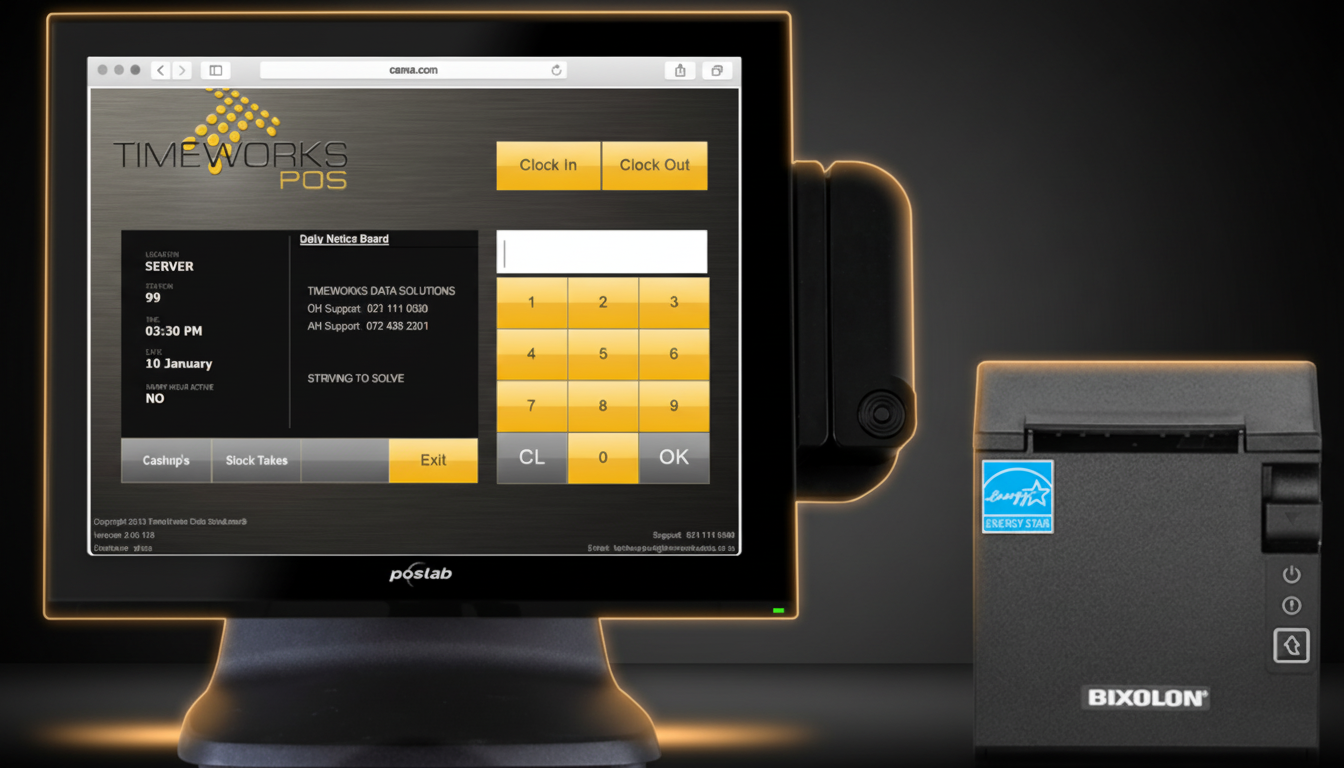
Modern TimeWorks Poslab POS terminal with Bixolon printer - the upgrade destination
The Upgrade Destination

What a Modern Terminal
Actually Looks Like

This is a real TimeWorks terminal: Poslab widescreen display running our POS software, paired with a Bixolon thermal printer. Commercial-grade, fanless, IP54-rated. The kind of hardware that runs for years without service calls.

24/7
Duty Cycle
10M+
Touch Cycles
IP54
Dust & Water
R99
Daily Rental
04
bolt

No Load Shedding Resilience

This one is uniquely South African, and it is not going away. Stage 2 or stage 4, your POS system needs to survive power interruptions without corrupting data or losing open transactions.

Older terminals with mechanical hard drives are particularly vulnerable. When power drops mid-write, the drive head can land on data sectors, causing corruption that ranges from a single corrupted record to a database that will not reopen. Newer terminals running SSD storage handle sudden shutdowns far more gracefully. The absence of moving parts means there is nothing to crash. Equally important is UPS integration: modern POS terminals should shut down cleanly via a UPS signal rather than abruptly losing power.

TimeWorks uses a Microsoft SQL backend, which includes transaction logging that protects data integrity during unexpected shutdowns. But the SQL log still depends on the hardware being able to write that log before power is lost. An SSD-equipped terminal with UPS integration gives you that window; an ageing HDD without UPS does not.

SA Stat: Load shedding causes an estimated R900 million in business losses per stage-day. Protected hardware is not optional: it is risk management.
05
build_circle

Your Support Provider Cannot Source Parts

When a hardware technician tells you "we cannot get that part anymore," that is the clearest possible signal that you are running end-of-life equipment. Supply chains for discontinued hardware dry up fast: motherboards for 2012-era terminals, proprietary power supplies, specific RAM modules. All become unavailable within a few years of a product line being discontinued.

At this stage, every repair is a gamble. You pay the labour cost, wait several days for the technician to source a compatible part from a secondary market supplier, and then discover at installation that the refurbished component has its own remaining lifespan of 6 to 18 months. The cumulative cost of reactive repairs on end-of-life hardware nearly always exceeds the cost of a replacement terminal within two years.

TimeWorks carries a range of refurbished terminals as a cost-effective bridge option: professionally reconditioned, tested, and backed by the same support infrastructure as new units. This can be the right move for businesses that are not ready for a full upgrade but need reliable hardware immediately.

Cost check: If a single repair costs more than 30% of a replacement terminal's price, the economics of repair no longer make sense.

"The most expensive POS hardware is the hardware that fails on a Saturday afternoon in December."

What to Do Next

If you recognised your current setup in two or more of the signs above, you have three realistic paths forward. The right choice depends on your budget, timeline, and how urgently the hardware needs to be replaced.

upgrade

Full Upgrade

New terminals, peripherals, and a current-generation SQL-backed POS deployment. Best for growing operations.

View Hardware Catalogue
recycling

Refurbished Units

Professionally reconditioned terminals at a fraction of new hardware cost. Ideal bridge for budget-conscious decisions.

Browse Refurbished Stock
receipt_long

Hardware Rental

Preserve capital with a monthly rental arrangement. Includes maintenance and hardware refresh cycles.

Explore Rental Plans

Not sure which path is right for you? The most practical starting point is a hardware assessment. A TimeWorks technician will review your current setup, benchmark performance, check peripheral compatibility, and give you a clear recommendation, with no obligation to purchase.

Free Hardware Assessment

Let our technicians evaluate your current POS hardware and give you an honest recommendation. No sales pitch: just a clear technical view of where you stand.