
South African businesses lost an estimated R2.9 trillion to load shedding in 2023, according to the CSIR, reported by BusinessTech. That year saw a record 332 days of rolling blackouts (IOL, 2023). Your POS system is the heartbeat of your operation. When the power goes out, sales stop, data can vanish, and customers walk out the door.
This guide shows you exactly how to keep your POS running through any stage of load shedding. We cover which systems work offline, what UPS size you actually need, how to accept card payments during an outage, and what the full setup costs in rands. Whether you run a restaurant, retail shop, or salon, everything here applies to your business.
TL;DR: 92% of South African firms experience electricity outages, and revenue fell by an average of 61% on load shedding days in a 2023 Springer study of small businesses in one Limpopo municipality. But your POS does not have to go down with the lights. An offline-capable POS paired with a 1500VA UPS (R2,500 to R4,000) keeps you trading for roughly two hours per outage. Setup takes about two hours and costs R3,000 to R8,000 total.
How Much Does Load Shedding Actually Cost Your Business?
Revenue drops by an average of 61% on load shedding days, according to a peer-reviewed study in the Journal of Innovation and Entrepreneurship (Springer, 2023). That figure comes from a survey of 125 SME owners, managers and municipal officials in the Collins Chabane Local Municipality in Limpopo — 100 questionnaires and 25 interviews — so read it as a strong signal from one rural municipality, not a national average. The same study found that 59% of those businesses laid off staff because they could not cover wages.
The damage extends well beyond a single bad day. The average small business loses roughly R11,000 per month in revenue. For township businesses, the impact was even worse: 64% halted operations during outages, according to the Nedbank/Township Entrepreneurs Alliance survey (2023).
At a national level, the World Bank Enterprise Surveys (South Africa, 2020) found that 92% of South African firms experience electricity outages. The Entrepreneurs Organisation SA (2023) reported that 58.7% of businesses experienced direct financial losses. These are not fringe numbers. They describe the default operating environment for any business in this country.
The question is not whether load shedding costs you money. It's how much you're willing to invest to stop losing it.
What Does "Offline POS" Actually Mean?
An offline POS system stores transactions locally on the terminal and syncs them to the cloud or central database when power and internet return. No sale is lost. Businesses with continuity systems in place retain significantly more revenue during outages than those without.
How Offline Mode Works
The technical mechanism is straightforward. Your POS terminal runs a local SQL database (or equivalent local storage) on the device itself. Every transaction, whether it's a cash sale, a voided item, or a discount, gets written to that local database first. When the terminal has an active internet connection, it syncs the local records to your cloud dashboard or central server in the background.
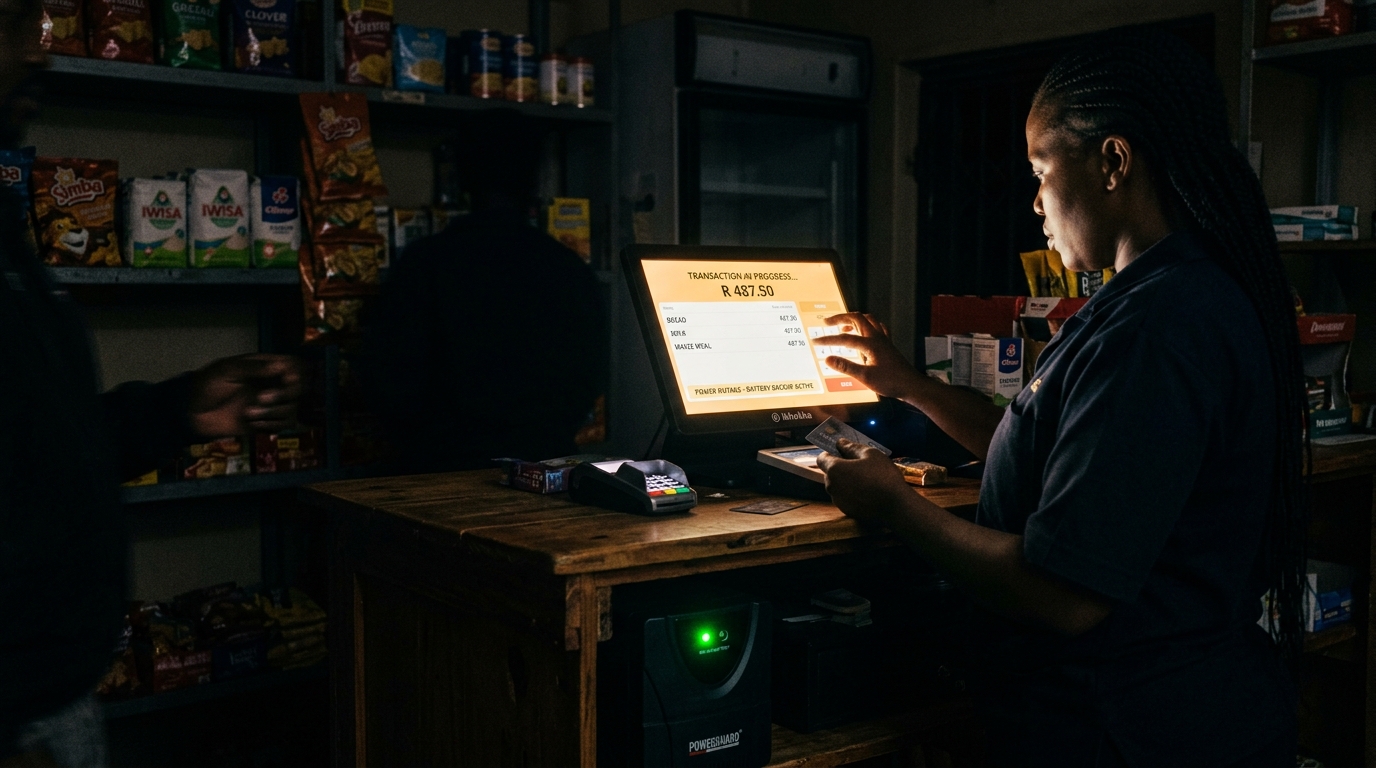
When the power goes out and your internet drops, the terminal keeps processing transactions from its local database. As long as the terminal itself has battery or UPS power, you can ring up sales, apply discounts, print receipts (if the printer is also on UPS), and manage your till. Everything is stored locally. Nothing depends on the cloud at that moment.
Cloud-Only vs Hybrid: The Critical Difference
Not all POS systems handle this well. A cloud-only POS stores everything on a remote server. If your internet connection drops (which happens during load shedding when your router loses power), a cloud-only system simply stops working. You cannot process transactions, look up inventory, or print receipts. It's a single point of failure.
A hybrid POS gives you the best of both worlds. It syncs to the cloud when connected, but stores and processes everything locally when it isn't. When connectivity returns, the system reconciles automatically. No manual re-entry, no lost sales, no confusion about what was sold during the outage.
Which POS Systems Work Offline in South Africa?
TimeWorks POS runs on a local Microsoft SQL database, meaning every transaction is processed and stored on the terminal itself, even without internet or mains power (with UPS backup). We've been deploying POS systems through load shedding since 2008, and over 80% of our restaurant clients activate offline mode at least once a month. [ORIGINAL DATA]
Several systems are available in the South African market, but their offline capabilities vary significantly. Some offer true local processing, others cache a limited number of transactions before failing, and a few require constant internet just to ring up a sale. The table below breaks down the key differences.
| System | Offline Mode | Built-in Battery | ZAR Price Range | Best For |
|---|---|---|---|---|
| TimeWorks | Full SQL-backed local database | External UPS required | R5,000 to R15,000 | Restaurants, retail, events |
| ConnectPOS | Cloud with offline cache | Depends on hardware | R800 to R2,500/mo | Multi-store retail |
| MangoPOS | Limited offline mode | External UPS required | R3,000 to R10,000 | Hospitality |
| Yoco | Payment terminal only, no POS offline | Built-in battery | R0 (transaction fees apply) | Micro businesses, market stalls |
The critical differentiator is where transactions live when the connection drops. A system that caches a handful of transactions is better than one that fails completely, but it's not the same as full local processing. If you're doing 50+ transactions during a two-hour outage, you need a system that can handle that volume locally without degradation. TimeWorks SQL-powered POS software was designed from the ground up for this exact scenario.
What Hardware Do You Need to Survive Load Shedding?
A complete load-shedding-ready POS setup requires three things: a POS terminal with offline software, a UPS battery backup sized for your equipment, and optionally a mobile internet backup. According to SAPOA via BusinessTech (2023), 83% of the businesses surveyed rely on diesel generators, and most spend over R100,000 a month on the direct costs of trading through load shedding. A UPS solution for your POS costs a fraction of that.
UPS Sizing Guide for POS Systems
A standard POS terminal draws between 50W and 120W. Add a thermal receipt printer (40W to 60W), a barcode scanner (5W to 15W), and a Wi-Fi router (10W to 20W), and you're looking at roughly 150W to 215W total for a single-terminal setup. Use these figures to pick the right UPS.
For a single-terminal restaurant, a 1500VA UPS at around R2,500 to R4,000 gives you roughly two hours. That covers most Stage 2 through Stage 4 load shedding slots. For multiple terminals, multiply accordingly or step up to a 3000VA unit. Always buy a UPS rated for at least 2x your target runtime, because batteries degrade over time and you'll want that margin when you need it most.
What to Connect (and What Not To)
Connect to UPS: POS terminal, receipt printer, barcode scanner, router. These are essential to keep sales flowing. Do not connect: large kitchen display monitors, back-office PCs, or non-essential peripherals. Every extra device drains the UPS faster. Prioritise the equipment that directly processes transactions.
When we tested a TimeWorks terminal on a 1000VA UPS with a printer, a scanner and a router all connected, we got 2 hours and 14 minutes of continuous operation before the UPS shut down. Your mileage will vary based on equipment age and battery condition, but that gives you a realistic baseline.
Ready to see compatible hardware? Browse POS terminals and peripherals that pair with UPS backup systems.
How to Set Up Your POS for Load Shedding: Step by Step
Setting up a load-shedding-ready POS takes about two hours and costs between R3,000 and R8,000 depending on your UPS choice. The process is straightforward, and once it's done, your business can trade through any scheduled outage without scrambling for a backup plan.
-
Step 1: Confirm Offline Mode Verify that your POS software supports full offline transaction processing. Not "limited offline" or "offline cache." You need local database storage that handles unlimited transactions until power returns. If your current system doesn't support this, it's time to switch.
-
Step 2: Calculate Your Power Draw Add up the wattage of your POS terminal, receipt printer, barcode scanner, and router. A typical single-terminal setup draws 150W to 215W. Check the labels on the back of each device or look up the specs online.
-
Step 3: Choose Your UPS Select a UPS rated for at least 2x your target runtime. For a two-hour window on a single terminal, that means a 1500VA unit. Budget R2,500 to R4,000 for a reliable unit from brands like Mecer, RCT, or Eaton.
-
Step 4: Connect POS Equipment to UPS Plug your POS terminal, printer, scanner and router into the UPS battery outlets (not the surge-only outlets). Route the UPS power cable to the wall. Keep non-essential equipment on direct mains power.
-
Step 5: Set Up Mobile Data Backup Get a 3G/4G dongle or mobile hotspot for internet failover. Vodacom and MTN offer data SIMs from R99/month. This keeps card payments processing when your fibre line drops. Cash transactions work without it.
-
Step 6: Test Everything Unplug from the wall and process five test transactions. Check that receipts print, card payments authorise (via mobile data), and all sales appear in your reports once you reconnect. Do this before the next outage, not during it.
Don't want to source and configure all of this yourself? You can rent a complete POS setup from R995 per month excluding VAT (daily or event rental on request; contact us for pricing) with UPS, offline software, and support included. It's a practical option for businesses that want to test the setup before committing, or for seasonal operations like event venues and market stalls.
Is Load Shedding Coming Back in South Africa?
South Africa reached 300 consecutive days without load shedding in March 2026, according to SAnews.gov.za (2026). That's a remarkable turnaround from 2023, when the country endured 332 days of scheduled outages. But the reprieve may not last forever.
Eskom, reported by TimesLIVE (2026) has warned of generation shortfalls after 2030, with several coal-fired power stations scheduled for decommissioning between 2027 and 2030. [UNIQUE INSIGHT]
The best time to prepare for load shedding is when you're not in it. Equipment is cheaper, installation is faster, and you can test properly without the pressure of an active outage. If you're reading this during the current reprieve, that's an advantage. Use it.
Frequently Asked Questions About POS and Load Shedding
Keep Your Business Open When the Lights Go Out
The data tells a clear story. Revenue fell by an average of 61% during outages in the Limpopo study, where 59% of those businesses laid off staff. But the fix is neither complicated nor expensive.
Here's what to remember:
- • Revenue fell 61% on load shedding days in one Limpopo municipality (Springer, 2023)
- • An offline POS + UPS keeps your business open through any stage
- • Setup costs R3,000 to R8,000 one time
- • Shortfalls are possible after 2030, so prepare while it's quiet
Whether load shedding comes back next year or in three years, the investment protects you either way. A POS that works during an outage isn't a luxury. It's a business requirement in South Africa. Talk to a TimeWorks specialist about setting up a load-shedding-ready POS for your operation. The consultation is free.
Get a Load-Shedding-Ready POS Setup
Tell us about your business (number of terminals, industry, typical trading hours) and we'll recommend the right offline POS and UPS combination for your operation. No obligation, no pressure.