
Most retailers spend weeks comparing POS software on features, on pricing and on vendor support, and then spend fifteen minutes choosing the hardware it runs on. That is the wrong way around. Hardware is the physical layer that your staff touches hundreds of times a day. A sluggish barcode scanner adds two seconds per item; across a thousand items in a busy shift, that is more than half an hour of wasted time. A receipt printer that jams during peak hours slows you down, erodes customer confidence and puts your cashier in an impossible position. A till that lacks battery backup goes dark the moment load shedding hits, and in South Africa, load shedding is not a contingency: it is a scheduled reality.
This guide covers every hardware component in a retail POS environment, from the terminal on the counter to the UPS in the back room. Whether you are outfitting a single-lane convenience store, a busy superette, or a multi-lane clothing retailer, the principles below will help you choose equipment that earns its keep for five or more years without becoming a daily source of operational frustration.
point_of_sale Why Hardware Matters as Much as Software
Your POS software is only as reliable as the hardware it runs on. An enterprise-grade SQL point of sale system installed on an underpowered consumer desktop will perform worse than a mid-range system on commercial-grade hardware. This is not a theoretical observation: it is the single most common cause of slow checkout speeds and system crashes that TimeWorks technicians encounter when called to diagnose "software problems" that turn out to be hardware failures.
The right peripherals also directly affect staff behaviour. When a scanner reads first-time, every time, cashiers move without hesitation. When a printer cuts reliably and the cash drawer opens smoothly, the checkout rhythm becomes automatic. Friction in the hardware layer creates friction in the service layer, and service friction is the fastest way to lose a customer who had other options.
There is also a total cost argument that most buyers miss. Commercial-grade POS hardware is more expensive upfront but significantly cheaper over five years. A R3,500 commercial thermal printer that runs for seven years costs less per year than a R1,200 home-brand unit that needs replacement after 18 months and a service call in between. Budget the ownership horizon, not the purchase price.
"The right hardware is invisible: staff stop thinking about it because it just works. The wrong hardware becomes all anyone talks about."
TimeWorks: 25 Years of POS Hardware Implementation
monitor The POS Terminal
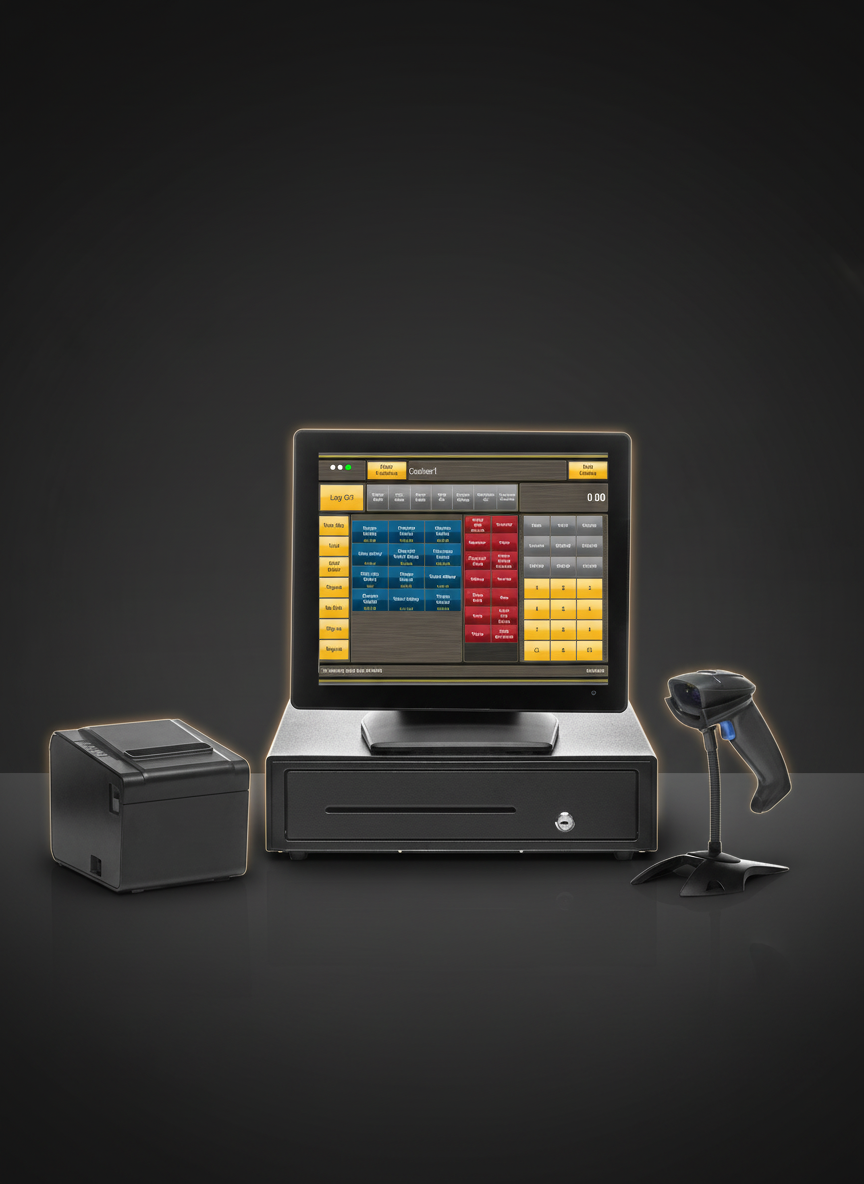
The terminal is the heart of your POS setup. Everything else (scanners, printers, drawers) is peripheral. Terminal selection comes down to three decisions: form factor, processor specification, and build quality.
Touchscreen vs traditional monitor and keyboard. Touchscreen all-in-one terminals dominate modern retail for good reason: a single surface with no keyboard means less desk clutter, faster item lookup by cashiers who know the interface, and easier cleaning. The Toshiba TCx series and similar commercial-grade all-in-ones are built with sealed touchscreens, bezels that shrug off a spill and mounting rated for industrial duty, and they survive years on a busy counter. Traditional monitor-and-keyboard setups are still appropriate in back-office environments, returns counters, or admin stations where the user needs a full keyboard, but as a primary checkout interface, they are increasingly outpaced.
Processor requirements. Running a Microsoft SQL-backed POS system on an Intel Core i3 or equivalent AMD Ryzen processor with 8GB of RAM is comfortable. Paired with an SSD rather than a spinning hard drive, transaction commit times drop dramatically. Do not accept a system spec that includes an HDD. The seek time difference between an SSD and HDD is the difference between a 0.2-second transaction and a 1.4-second one. At 400 transactions per day, that SSD pays for itself in checkout speed alone within weeks.
Durability and environmental rating. Commercial POS terminals carry an IP rating that consumer hardware does not. Toshiba's retail-grade units are engineered for continuous 24-hour operation, fanless or with easily serviced cooling, and sealed ports that prevent dust and moisture ingress. In a bakery or deli environment, this is not optional. Fan-cooled consumer desktops placed near food prep areas fail rapidly from grease particulate accumulation: a problem you will not have with purpose-built hardware.
barcode_scanner Barcode Scanners
Barcode scanning speed and reliability determine checkout throughput more than almost any other single hardware component. A scanner that hesitates on damaged barcodes, requires precise aim, or loses its wireless connection mid-shift creates queue pressure that cashiers cannot manage away.
| Feature | 1D Laser Scanner | 2D Imager Scanner |
|---|---|---|
| Standard Retail Barcodes (EAN/UPC) | Excellent | Excellent |
| QR Codes & Mobile Vouchers | No | Yes |
| Damaged or Partial Barcodes | Limited | Strong |
| Omnidirectional Read | No: requires alignment | Yes |
| Cost | Lower | Moderate premium |
| Best Use | High-volume standard SKU retail | General retail, mixed barcode types |
For most South African retail environments, a Zebra DS2208 or DS4608 2D imager is the right choice. The omnidirectional read capability means cashiers can pass items across the scanning window without needing to orient the barcode: a genuine time saving in a high-volume checkout. The 2D imager also reads QR codes, which matters as loyalty programmes, digital vouchers, and SnapScan QR payments become standard. View the Zebra barcode scanner range in the TimeWorks hardware catalogue.
Wired vs wireless. Corded scanners are more reliable in environments with dense Bluetooth or Wi-Fi traffic: supermarkets, busy retail floors, food courts. Wireless scanners are appropriate where the cashier or floor staff need to move away from the counter, such as in warehousing or stock-take workflows. For a fixed checkout lane, wire the scanner: one less radio frequency variable to manage and one less battery to charge.
Presentation scanners (the flat-bed variety mounted flush with the counter surface) are the right choice for very high-volume lanes. Cashiers sweep items across rather than picking up a handheld, reducing repetitive strain and increasing throughput significantly. These are standard in supermarkets and bottle stores where scan speed directly determines queue length.
receipt Receipt Printers
Receipt printers are the most-replaced peripheral in any retail environment, not because they are fragile, but because they are used constantly. Choosing the wrong printer technology or an undersized paper roll creates daily maintenance overhead that experienced retailers have long since eliminated by standardising on proven commercial models.
| Feature | Thermal Printer | Impact (Dot Matrix) Printer |
|---|---|---|
| Print Speed | 200-300 mm/s | 50-100 mm/s |
| Print Quality | Sharp, clean output | Adequate: dot pattern visible |
| Heat & Oil Environment | Thermal paper fades above 60°C | Unaffected by heat: ideal for kitchens & delis |
| Noise Level | Near-silent | Audible impact noise |
| Consumables Cost | Thermal rolls: moderate cost | Ribbons: moderate cost, more replacements |
| Auto-Cutter | Standard on commercial models | Available on select models |
| Best Use | General retail checkout | Kitchen order printing, deli, bakery |
The Epson TM-T88VI thermal printer is the industry benchmark for retail receipt printing: 300mm/s print speed, an integrated auto-cutter that reliably separates each receipt, and Ethernet, USB, or Bluetooth connectivity options. Paper width matters too: 80mm paper is the retail standard, providing enough column width for itemised receipts with VAT lines, loyalty points, and promotional messaging. The narrower 58mm format is appropriate only in very compact setups like pop-up stalls where counter space is critical.
For deli, bakery, and hot food environments, Epson's TM-U220B impact printer handles the heat and grease vapour that degrades thermal paper rapidly. The ribbon-based mechanism produces a readable chit even in 70°C environments where a thermal receipt would turn completely black within minutes. View the thermal receipt printer range available through TimeWorks.
payments Cash Drawers
A cash drawer is the most underspecified component in most retail setups and the one most likely to become a security liability when chosen poorly. The fundamentals are simple but the details matter: size, release mechanism, coin tray configuration, and how it integrates with the rest of your hardware.
Size options. Standard retail cash drawers come in two common footprints: 410mm wide for most single-lane retail counters, and 460mm wide for high-volume tills where the cashier needs more surface area to handle notes quickly. Under-counter mounting is standard practice; drawers sit flush beneath the printer, triggered electronically, and take up no counter surface. The compact cash drawer in the TimeWorks catalogue suits smaller counter formats without compromising security.
Electronic vs manual release. In a properly configured POS setup, the cash drawer should only open when a transaction is completed, electronically triggered by the receipt printer's cash drawer port (typically an RJ11 connection). Manual release keys exist for authorised float checks and end-of-day counts, but a drawer that cashiers can open on demand without a transaction record is a theft exposure. Ensure the POS software logs every drawer-open event with a timestamp and cashier ID.
Coin tray configurations. South African retail requires a tray that handles R5, R2, R1, 50c, 20c, and 10c coins with a logical layout. Standard 8-coin trays with spring-loaded compartments allow cashiers to count change by feel rather than sight, reducing error rates during busy periods. Removable coin trays make end-of-day float counting faster: lift the tray, empty and count, replace. Note compartments should accommodate the full South African note range with dedicated slots for R10 through R200.
monitor Customer Displays
Customer-facing displays do two jobs: they confirm the price of each scanned item in real time, reducing price disputes and building customer trust; and in modern configurations, they serve as a low-cost advertising medium between transactions. Both functions justify the addition of a display to every checkout lane, and the cost of a commercial customer display is modest compared to the service benefits.
Rear pole displays (VFD), the traditional alphanumeric vacuum fluorescent units, are reliable, power-efficient, and readable at a distance. They display the current item price and running total in bright amber or green digits that are visible in direct sunlight conditions. The Toshiba VFD pole display is a proven, low-maintenance option that integrates directly with the POS terminal and requires no configuration beyond a COM port assignment.
Customer-facing touchscreens take the display concept further. A secondary screen mounted on the customer-facing side of the terminal shows the full itemised basket, promotional messaging, loyalty point balance, and payment options. The Toshiba customer-facing display enables retailers to run promotional slides between transactions: essentially a digital signage panel that earns its place in the hardware budget through both service improvement and marketing capability.
In any environment where price disputes are common (markets, mixed-price delis, discount retailers), a customer display reduces cashier-customer friction significantly. The customer sees each item scan and price in real time. Discrepancies are caught immediately, before the total is tendered, rather than escalating into a refund queue.
print Label Printers
For retailers with produce, bakery, deli, or butchery departments, label printing is not optional: it is a compliance and operational requirement. Labels carry the product description, weight, price per kilogram, total price, and sell-by date. In South Africa, consumer protection legislation requires this information to be clear and legible on all pre-packed foodstuffs sold by weight.
Scale integration is the critical factor here. A label printer that connects directly to a trade-approved scale prints labels on demand as items are weighed, with price automatically calculated from the scale reading. This eliminates the manual entry step, removes human error from price calculation, and speeds up the weighing and labelling workflow significantly. The Zebra ZD420 and similar direct thermal label printers integrate cleanly with most commercial scales through a serial or USB connection and can be configured to output labels in any format required by the POS system.
Pre-printed vs on-demand labels. Pre-printed label rolls cost less per label on high-volume, fixed-format runs for standard product lines. On-demand thermal label printers are better for variable-weight items, short-run promotions, and markdown labels where the price changes dynamically. Most serious retail operations need both: a high-volume label printer for standard stock and a direct-thermal unit at the deli or bakery counter for weighed items.
Label stock quality matters more than most buyers realise. Cheap thermal label stock fades within days on a refrigerated shelf: the adhesive fails, the print becomes illegible, and the label peels mid-shelf. Invest in label stock rated for the storage temperature of the environment. Freezer-rated label stock uses a different adhesive formulation than ambient-temperature stock and maintains legibility through the full cold chain.
scale Scales
Any retailer selling goods by weight (produce, deli, bulk dry goods, butchery) needs scales. In South Africa, this means legal-for-trade (LFT) certification, which is a non-negotiable compliance requirement. A scale used for trade purposes must carry South African National Accreditation System (SANAS) type approval and must be verified by an accredited verification officer. Unverified scales used for trade are subject to prosecution under the Trade Metrology Act.
Integrated vs standalone scales. A POS-integrated scale sends the weight reading directly to the POS software, which calculates the price and adds the item to the transaction without a separate manual entry step. This integration is the difference between a three-second weighing workflow and a twelve-second one. For a busy produce or deli counter, that difference is meaningful over the course of a day.
Standalone scales are appropriate for back-of-house receiving and stock management where trade verification is not required and the scale's output is being used for internal purposes. Front-of-house retail sales always require an LFT-verified, POS-integrated scale where goods are sold by weight.
contactless Payment Terminals
Card payment terminals are the interface between your POS system and the payment network, and they carry more integration complexity than any other peripheral. The critical distinction is between a payment terminal that is integrated with the POS, where the card amount is sent directly from the POS software to the terminal, and a standalone terminal where the cashier manually types the amount.
Standalone terminals create a reconciliation problem. The cashier reads the amount from the POS screen, types it into the card machine, processes the payment, and the two systems never communicate. Manual capture errors (a keystroke away from an overcharge or undercharge) are frequent, and daily reconciliation between the POS report and the card settlement statement becomes a time-consuming and error-prone exercise. End-of-month discrepancies from this setup cost some retailers thousands of rands in unclaimed revenue annually.
Integrated payment processing eliminates this exposure. The POS sends the exact transaction amount to the terminal, the terminal processes the payment, and the result (approved or declined) is written back to the transaction record automatically. No manual amount entry, no reconciliation gap, no cashier error. TimeWorks integrates with major South African acquiring banks including Nedbank, Standard Bank, FNB, and ABSA, as well as payment facilitators supporting NFC tap-to-pay, contactless Mastercard and Visa, and QR-based payment methods including SnapScan and Ozow.
NFC and tap-to-pay capability is now a baseline expectation for retail customers, not a premium feature. Any terminal procured in 2026 must support EMV contactless transactions. The speed advantage is significant: a tap transaction processes in under three seconds versus eight to twelve seconds for a PIN entry: a meaningful throughput improvement at a busy checkout.
battery_charging_full UPS and Battery Backup for Load Shedding
In any other country, UPS selection would be a minor operational consideration. In South Africa in 2026, it is a tier-one infrastructure decision. Load shedding is not an edge case: it is a scheduled, recurring disruption that occurs multiple times per week across most of the country. A retail operation without adequate battery backup is not a resilient business; it is a business that closes during government-mandated power interruptions.
Minimum runtime requirements. A stage 2 load shedding slot runs for two hours. Stage 4 can mean four-hour blocks. Your UPS must keep the essential POS hardware (terminal, printer, router, network switch) running for at least four hours on a single charge to cover the worst-case scenario without generator support. This requires a UPS with a much larger battery capacity than the typical 10-15 minute "graceful shutdown" UPS used in office environments.
What needs to stay on. Prioritise your load. The POS terminal and receipt printer are essential. The cash drawer needs no power to open once the printer triggers it. Your router and network switch need power to maintain your LAN and potentially your card machine's connectivity. LED lighting in the checkout area helps: consider separating it onto the UPS circuit so cashiers can continue operating safely in the dark. A typical single-lane retail checkout with a commercial-grade UPS draws 200-350W; a 1kVA UPS with a 100Ah lithium battery provides four to six hours of runtime at that load.
Lithium vs lead-acid batteries. Lithium iron phosphate (LiFePO4) UPS units are the correct choice for a retail environment. They maintain capacity across 2,000+ charge cycles without significant degradation, charge faster from generator power during the outage, and are lighter and more compact for under-counter installation. Lead-acid UPS units are cheaper upfront but degrade rapidly under frequent cycling: exactly the condition South African load shedding creates. A lead-acid UPS that gets cycled twice a day loses meaningful capacity within six months; a LiFePO4 unit maintains over 80% capacity after three years of the same use.
"Every South African retailer needs to treat their UPS as a primary operational asset, not a backup accessory. The grid schedule is your opening and closing constraint if you haven't solved this."
TimeWorks: POS Infrastructure Advisory
wifi Networking
A single-lane retail setup with one terminal, one printer, and a local SQL server can run on a simple switch. A five-lane supermarket with back-of-house admin terminals, a dedicated server, kitchen displays, and wireless barcode scanners needs a properly designed network. Most network failures in retail POS environments are not caused by faulty hardware: they are caused by inadequate network design.
Wired vs Wi-Fi. For fixed checkout terminals, wire them. A Cat6 cable to each terminal, printer and switch port holds its speed and cannot be knocked out by the RF congestion that degrades wireless performance in dense commercial environments. Wi-Fi is appropriate for mobile devices: handheld stock-take scanners, manager tablets, customer-facing ordering kiosks, but a cashier's primary terminal should never depend on a wireless connection. One wireless interference event during a peak trading period costs more in lost goodwill than the cost of the cable run.
Switch requirements for multi-lane setups. For two or more lanes, a managed gigabit switch allows you to segment traffic, prioritise POS data over less critical LAN traffic, and monitor port status remotely. Unmanaged switches are adequate for very small single-site operations; anything with three or more terminals benefits from a managed switch for visibility and control. Keep the switch on the UPS circuit. A network switch that goes down during load shedding takes every wired terminal with it.
Internet connectivity for cloud functions. Even on an on-premise SQL POS system, certain functions: card machine authorisation, online reporting, remote support access, and software updates, require internet connectivity. A dual-WAN router with a primary fibre connection and a 4G/LTE failover SIM ensures that card processing and remote management remain available even when the fibre line is down. This is a low-cost insurance policy against what is otherwise a significant uptime risk.
inventory Hardware Bundles vs Piecemeal Procurement
Sourcing POS hardware piecemeal (terminal from one supplier, printer from another, scanner from a third) sounds like a way to optimise each component and get the best price on each line item. In practice, it creates a support nightmare. When something goes wrong, each vendor points at the others. Driver conflicts between components sourced from different ecosystems are common. And the time spent managing three separate warranty and support relationships is a hidden cost that never appears in the comparison spreadsheet.
A hardware bundle from a single POS specialist arrives pre-tested, already configured and supported as one system. Every component is known to work with every other. The software is installed and configured before delivery. When support is required, one phone call covers the entire system. The pricing may be marginally higher on individual line items but the system cost, including support, downtime avoidance, and deployment time, is reliably lower.
For businesses that want to avoid capital expenditure entirely, TimeWorks hardware rental converts the bundle purchase into a monthly operational cost. Hardware, software, installation, configuration and support are included in a single per-day rate. There is no procurement process, no warranty management, and no capital depreciation to account for.
storefront TimeWorks Hardware Catalogue
TimeWorks stocks and supports a range of commercial-grade POS hardware selected for South African retail conditions. Every product in the catalogue is tested with the TimeWorks POS software, supported by local technicians, and available for outright purchase, rental, or lease. The full catalogue is available at hardware-catalogue.html and the hardware overview page at hardware.html.
-
Zebra DS4608 Barcode Scanner 2D omnidirectional imager, reads standard retail barcodes, QR codes, and GS1 DataMatrix. USB and optional Bluetooth variants. IP42-rated for light splash resistance.
-
Epson TM-T88VI Thermal Receipt Printer 300mm/s print speed, 80mm paper width, auto-cutter, Ethernet + USB. The industry benchmark for retail receipt printing: quiet, quick and built to keep going at peak.
-
Under-Counter Cash Drawer 410mm format, electronic RJ11 trigger, 8-coin removable tray, dual note slots, keyed manual release. Available in standard and compact widths.
-
Toshiba Customer-Facing Display Full-colour secondary screen for customer basket confirmation, promotional messaging between transactions, and loyalty balance display.
-
Toshiba VFD Pole Display Vacuum fluorescent rear-facing display, bright and readable in direct light, COM port connection, minimal power draw: the reliable low-cost customer display option.
-
LiFePO4 UPS for Load Shedding 1kVA-3kVA lithium iron phosphate UPS units rated for 2,000+ cycles. Minimum 4-hour runtime at POS checkout load. Pre-configured for under-counter installation.
For a complete hardware specification for your specific retail environment (including lane count, product categories, and any weighing or labelling requirements), contact the TimeWorks hardware team for a site-specific recommendation.
support_agent Book a Hardware Consultation
Choosing POS hardware without knowing the physical layout of your store, the transaction volume per lane, your load shedding exposure, and your budget horizon is guesswork. TimeWorks offers free hardware consultations for South African retailers: we assess your environment, recommend a bill of materials, and provide pricing for purchase, rental, or a managed monthly plan.
We cover the full Western Cape from Cape Town to George and beyond. For Gauteng, Eastern Cape, and other regions, remote assessment and logistics-managed delivery is available. Every hardware bundle we supply arrives pre-configured and tested, and the same team that installed it supports it from day one.
Get the Right Hardware for Your Store
Tell us about your retail setup (lane count, product mix, any weighing or label printing requirements) and we'll specify the hardware package that fits your operation and your budget. No obligation, no sales pressure.